What Is Codex? Features, Costs and a Practical Starting Guide
Product details last verified: September 16, 2026. Workflow examples are editorial suggestions; the dated field note below reports actual site work, not a comparative benchmark.
Codex is most useful to understand as a way to work on a project, not merely to receive a code snippet. The distinction matters: a suggested fix still leaves you with copying, testing and figuring out whether anything else broke.
A productive Codex workflow gives it a defined target, asks for an observable change, and requires evidence about what was checked. This guide explains how to structure that work even if you are not a full-time developer.
1. Work on files, not just answers
The Codex CLI can inspect a local project, edit files and run commands. It is a terminal-based entry point, with controls for permissions and model selection. Official CLI guide.
As a user, distinguish three outcomes: a proposed change, an applied change and a verified change. Ask the agent to identify which one it actually delivered.
For a website, “verified” should include the relevant screen sizes and interactions. For a data transformation, it should include missing values, duplicate records and a reconciliation of totals. Your acceptance criteria make the result reviewable.
2. Separate concurrent changes with worktrees
For Git projects, worktrees provide separate working copies that can support independent tasks. They help keep experiments apart; they do not remove the need to reconcile changes and test the combined result. CLI worktree additions also include experimental support, so check your client rather than assuming every interface behaves identically. Worktrees, changelog.
If you are new to version control, complete one small change first. Parallel work is useful only when you can keep track of what changed and why.
3. Preserve instructions and repeatable methods
OpenAI documents complementary customization layers: AGENTS.md for project guidance, Skills for reusable workflows and MCP for external tool connections. Customization overview.
An effective first project rule might be: “Do not publish; run the documented checks; report anything you could not verify.” A useful repeatable workflow might describe how to prepare a monthly report from approved inputs.
Avoid turning instructions into a sprawling wish list. Record the recurring mistakes that matter. Instructions should also be backed by actual access controls: a sentence saying “do not deploy” is not a substitute for limiting production credentials.
4. Model changes and saved settings
The model and pricing guides checked on October 15, 2026 list GPT-6 Astra, GPT-6.1 Sol and GPT-6 Luna, with access depending on plan, rollout and client. A model appearing in documentation does not establish that every account can select it. Model guide.
The September 14 changelog also announces GPT-5.5 retirement from ChatGPT, Work and Codex on October 14, 2026, excluding the API. Check saved configurations and recurring workflows if you explicitly selected that model. Retirement notice in the changelog.
Our practical recommendation is to begin with the available default, measure the result and increase complexity only when necessary. A more capable model cannot compensate for missing input files or an unavailable connection.
5. Codex and ChatGPT Work are not identical labels
OpenAI’s current desktop guidance separates Work conversations from the dedicated Codex development view and history. Check the actual surface you intend to use; do not attribute every Work capability to every CLI or IDE session. Product updates.
This is particularly important for non-developers. Your choice may be about the best workflow interface, not a choice between “an AI for code” and “an AI that cannot code.”
Pricing without surprises
Codex is included in several ChatGPT plans, including a free entry point; Plus is listed at US$20 monthly. Work and Codex share usage. API-key use follows a separate usage-based billing path. Pricing.
For a trial, record how many correction rounds you need and how long you spend reviewing the output. Those costs matter alongside the subscription. Do not enable additional paid usage without understanding the controls available to your account.
Three useful first tasks
These are MSL-designed evaluation exercises, not guaranteed outcomes.
A small layout repair
In this test copy of the site, find why the button overflows on a narrow screen and make the smallest fix. Preserve copy and unrelated styling. Do not deploy. Report changed files, checks completed and untested environments.
Inspect another page using the same component before accepting the change.
A repeatable data task
Build a process that counts records by channel using this anonymous sample CSV. Explain how duplicates and missing values are handled. Write a new output file, preserve the input and add a check that reconciles the total number of records.
Start with ten rows you can count manually. Then test a second input file.
A read-only project explanation
Without changing files, explain this app’s entry point, data flow, run instructions and external service connections. Identify the files you actually read. Label assumptions and unresolved questions.
This is a useful way to prepare for a handover or assess an unfamiliar internal tool before authorizing edits.
A safe starting sequence
Choose local or cloud execution, select the appropriate official client and check workplace approval. Prepare a backup or test copy. Begin with read-only inspection, authorize one small change, then review the diff and actual output.
Passing tests is evidence about the cases those tests cover, not proof of complete security or production readiness. Keep deployment as a separate decision.
Codex becomes easier to use when you replace “build everything” with a target, constraints and acceptance criteria. That is the difference between an impressive answer and work you can confidently review.
Field note: a WordPress editorial audit on September 25, 2026
Here is a real MSL workflow using Codex with a logged-in browser. The goal was to make a bilingual editorial site easier to trust and navigate. This is one observed task, not a Codex versus Cowork benchmark. We did not measure speed or error rates across products.
- Inspect the public pages first. We opened the homepage, article archive, About pages and a published model guide, then compared visible dates and links with the editor. A default WordPress Sample Page was publicly accessible; the English footer had no links.
- Check a claim against a primary source. An Astra guide showed an August 3 publication date although its subject was announced on September 3. We checked the OpenAI announcement date and changed the displayed post date, adding a correction note rather than quietly changing the timeline.
- Make small changes and verify them. We moved the boilerplate page to the recoverable trash, added About, Contact, Privacy and Disclaimer links to the English footer, and clarified when a guide reports official facts versus hands-on testing. We reopened the public URLs: the sample URL showed a not-found page, and the footer links reached their intended pages.
What this example does and does not prove: Codex can help inspect and update a site when it has authorized browser access, but each changed page needed a human-defined goal and a public-page check. The work does not establish that every article is accurate, that another AI would perform worse, or that a third-party review will approve the site. A useful acceptance checklist is: target URL, expected change, saved state, public result, and any remaining uncertainty.
MSL acceptance kit: verify one small website change
This is an original task and review template, not a reproduction of a product interface or a feature guarantee. For an MSL maintenance task, I want the target, saved change and public result to remain traceable.
A task brief you can copy
Target: the mobile layout of one specified page.
Problem: a table extends outside the article at a 390px viewport.
Acceptance: all table fields remain readable; the whole page does not scroll sideways.
Allowed scope: this page and required display settings. Save the original content first.
Preserve: numbers, photos, links and the translation relationship.
Verify: open the public page on desktop and at 390px. Record saving and public rendering separately.
Report: target URL / changes / checks / unverified cases / rollback steps.
Pass or hold: a review sheet
| Check | Pass example | Hold example |
|---|---|---|
| Scope | Only the specified table changed | Unrelated articles changed without a reason |
| Content | Numbers and links match the original | Readable layout but missing values |
| Public result | Table inspected at its public URL | Only the editor save was checked |
| Recovery | Original content and rollback steps retained | Original content unavailable |
An actual MSL check: on October 14, 2026, MSL updated its Japanese and English public PR tools and checked calculation results and a 390px layout in a signed-out browser. This validates those MSL pages, not every device or a general Codex success rate.
I would start with one table so failures are easy to isolate, then expand after inspecting the result. A completion report should keep untested devices explicitly untested.
Template prepared October 14, 2026; this is separate from the product verification date.
Official sources
From the publisher: how I would decide
The appeal of Codex to me is being able to follow a change from the original file to a result I can inspect. For MSL, I would start with one broken layout or one editorial correction, then verify both the saved change and the reader-facing page. I prefer small changes that are easy to explain and reverse. Generated code volume is not my measure of success; a reader being able to complete the intended action is. I would keep verification evidence beside the change rather than rely on a confident completion message.
An actual MSL acceptance check: testing the published URL tool
On October 15, 2026, the automation assistant operated the MSL UTM tool previously built and published during Codex-assisted site improvements, using a browser that was not signed in. This is acceptance testing of an existing deliverable, not a timed new-generation benchmark.
| Input | Acceptance requirement | Observed result |
|---|---|---|
| https://example.com/article/?a=1#section | Preserve query and fragment; add UTM parameters | Preserved a=1 and #section; added instagram/social/msl_lab |
| javascript:alert(1) | Reject the URL | Displayed an http/https error |
| https://user:pass@example.com/ (fictional) | Reject embedded credentials | Displayed the same error |
| Empty source | Require mandatory fields | Requested source, medium and campaign |
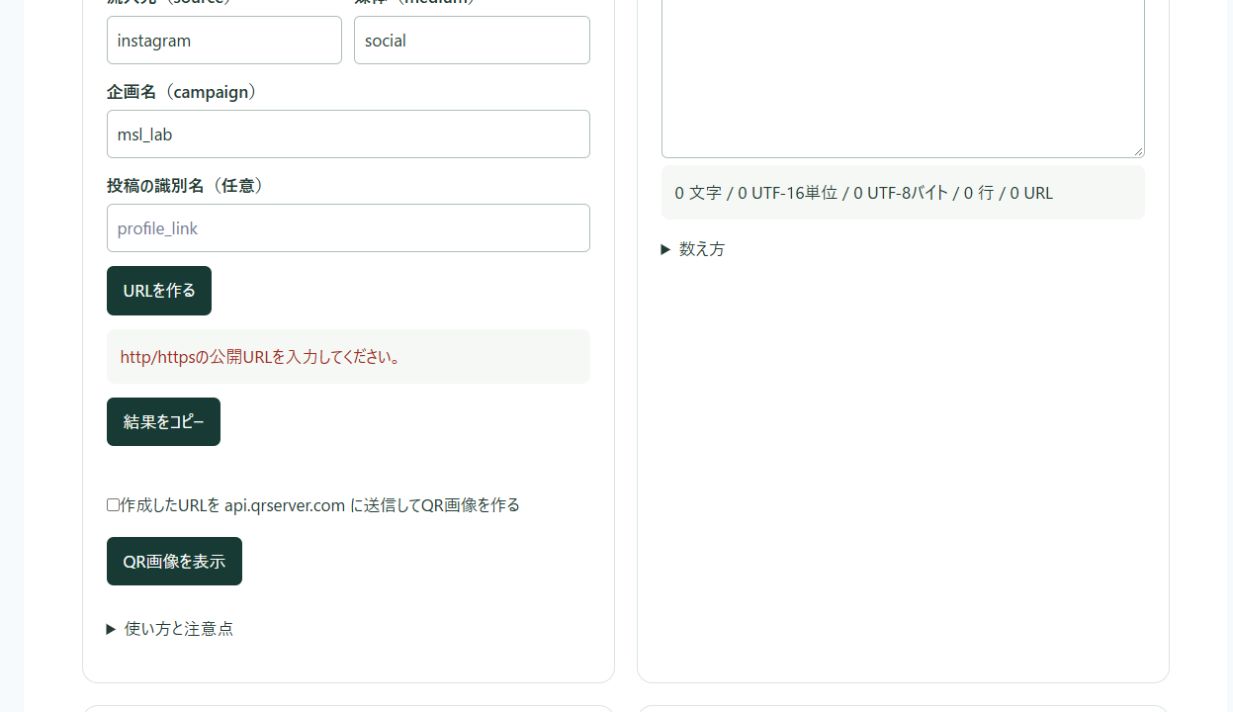
The kit includes a reusable brief defining permitted URL schemes, retained values, error cases and browser checks. It was written for reproduction; it is not a transcript of the original development conversation.
Download the free exercise kit (ZIP) — Japanese reusable brief and acceptance cases: 03-codex-brief.txt
My editorial decision
I would adopt a tool after testing ordinary inputs and inputs that should be rejected on the published page. A completion message alone is insufficient. Passing four cases is not a comprehensive security assurance; changes to input rules require repeating and extending the checks.